

Find your login page, sign in safely, and save it so you never have to hunt for it again – even if you have never done this before.
Your WordPress dashboard is the private control room for your website. It is where you add pages, write blog posts, update products, and change how your site looks.
Before you can do any of that, you need to log in. This guide walks you through it step by step. By the end, you will know how to reach your login page, sign in, and bookmark it for next time.
What Is the WordPress Dashboard? #
The WordPress dashboard (also called the admin area or wp-admin) is the behind-the-scenes part of your website that only you and your team can see. Your visitors see the public website. You see the control panel.
Think of it like a shop. Customers walk through the front door and browse the shelves, but only staff can go into the back office to change prices, restock shelves, and update displays. The dashboard is your back office.
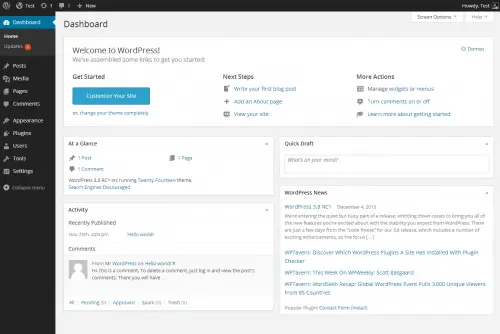
Logging in does not change anything on your live website. It simply unlocks your control panel so you can make changes when you are ready.
What You Need Before You Start #
Make sure you have these three things ready:
- Your website address (URL) — for example,
yourbusiness.com. - Your username or email address — created when your site was built.
- Your password — the secret code that proves the account is yours.
If you do not have your username or password yet, ask whoever built your website to send you your login details. Keep them somewhere safe, such as a password manager.
Step 1: Open Your Login Page #
Every WordPress website has a hidden login page. To reach it, type your website address into your browser’s address bar, then add /wp-admin to the end. For example:
yourbusiness.com/wp-adminPress Enter on your keyboard. WordPress will open the login screen.
Some websites use /wp-login.php instead. If /wp-admin does not work, try yourbusiness.com/wp-login.php. Both lead to the same place.
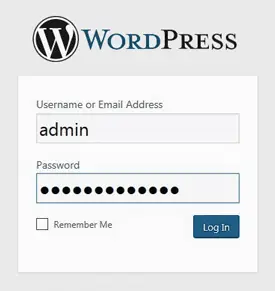
Step 2: Enter Your Username and Password #
- In the Username or Email Address box, type your username (or the email address linked to your account).
- In the Password box, type your password exactly as it was given to you.
Passwords are case-sensitive, which means uppercase and lowercase letters matter. Sunshine1 and sunshine1 are treated as two different passwords.
If you copy and paste your password, make sure you do not accidentally copy an extra space before or after it. A stray space is one of the most common reasons a correct password is rejected.
Step 3: Choose Whether to Stay Logged In #
Below the password box, you will see a small checkbox labelled Remember Me.
- Tick this box if you are using your own private computer. WordPress will keep you logged in for about two weeks, so you do not have to sign in every time.
- Leave it unticked if you are on a shared or public computer, such as one in a library or café. This keeps your account safe from the next person who uses that computer.
Step 4: Click the Log In Button #
Click the blue Log In button. If your username and password are correct, WordPress takes you straight to your dashboard.
You’ll see a dark menu running down the left-hand side (with items like Posts, Pages, and Settings) and a welcome area in the middle. You are now inside your control room.
Step 5: Bookmark Your Login Page #
So you never have to remember the web address again, save your login page as a bookmark. While you are on the login page, press Ctrl + D (Windows) or Cmd + D (Mac), then click Save. The page will now appear in your bookmarks for one-click access next time.
Bookmark the page ending in /wp-admin after you log in. That way, clicking the bookmark takes you to your dashboard instantly whenever you are already signed in.
How to Log Out Safely #
When you finish working, it is good practice to log out, especially on a shared computer.
- Move your mouse to the top-right corner of the screen, where your name appears.
- In the small menu that drops down, click Log Out.
WordPress signs you out and returns you to the login screen. Your website stays online for visitors the whole time — logging out only closes your private session.
A Quick Recap #
Here is the whole process at a glance:
1. Go to  yourbusiness.com/wp-admin
2. Type your username and password
3. Tick "Remember Me" (only on your own device)
4. Click "Log In"
5. You are in the dashboard
If your password is not working, see the related guide How to Recover a Lost Password. If the login page will not load at all, see “I Forgot My Login” — What to Do in the Troubleshooting section.